Quiz game maker for training: build a quiz race in 15 minutes
A quiz game maker for training turns your questions into a short game where answering is how you win. What to look for, how to build a quiz race step by step, and the lives, timer and pass-score settings that keep it a real test.
The Arcadedo team, Gametize
9 min read

A quiz game maker for training turns your questions into a short game where answering is how you win: a race, maze or match board with lives, a timer, instant feedback and a pass score. Look for one that explains each answer, works on phones without sign-up, carries your branding and reports the most-missed questions.
Most "quiz maker" tools build forms with a score at the end. A quiz game is different: every answer changes what happens on screen, so people want to get the next one right. This guide covers what a training quiz game maker needs, how to build a quiz race in Arcadedo step by step, and which settings keep the game a fair test rather than a toy. For the wider picture, see our guide to gamification in employee training.
What is a quiz game maker for training?
A quiz game maker is a tool that wraps training questions in a game. You write or upload the questions; the tool supplies the game, such as a race, a maze or a shooter, where each correct answer moves you forward. Players get a goal, stakes and instant feedback, and you get a score and a pass mark.
The questions do the teaching. The game gives people a reason to answer them carefully and to play again. That matters because answering questions is itself one of the best ways to remember material: people who practise recall remember more a week later than people who re-read (Roediger and Karpicke, 2006). A game simply makes that practice something people do without being chased.
What should a training quiz game maker have?
A good training quiz game maker explains every answer, lets you set a pass score, works on any phone without an app or account, carries your logo and colours, and shows which questions people miss. Nice-to-haves are AI drafting from your documents and a link you can reuse for refreshers.
| Feature | Why it matters for training | In Arcadedo |
|---|---|---|
| Explanation after each answer | A wrong answer becomes the moment people learn the rule | Yes, one per question |
| Pass score and lives | Turns play into a test with a clear bar | Yes, both adjustable |
| Per-question timer | Rewards recall over looking things up | 10 to 60 seconds |
| Plays in any browser, no account | No IT ticket, no app install, works on shift phones | Yes, one link |
| Your branding | Feels like your training, not a bought-in game | Logo, colours, cars and track |
| Most-missed questions report | Shows what to re-teach | Yes, on the game's analytics page |
| AI drafting from documents | Saves the slowest part of the job | PDF, Word or text, 5 credits per batch |
| Free to build and host | Lets you try before asking for budget | Yes |
Feedback with a reason is the item to check first. Learners who are told the right answer after a mistake remember far more than learners who only see "wrong" (Butler and Roediger, 2008).
Quiz game or live quiz show: which do you need?
Choose a live quiz show when everyone is in the same session at the same time and the goal is energy. Choose a self-paced quiz game when people play on their own schedule and you need a score per person. Most workplace training, such as onboarding, compliance and refreshers, is self-paced.
| Live quiz show | Self-paced quiz game | |
|---|---|---|
| When people play | Together, at a set time | Whenever suits them |
| Who sets the pace | The host | The player |
| Best for | Workshops, kick-offs, all-hands | Onboarding, compliance, product knowledge, refreshers |
| Score | Room leaderboard | Personal score against a pass mark |
| Replay | Rare | Easy; the same link works again |
Live tools are covered in our roundup of Kahoot alternatives for corporate training. Arcadedo games are self-paced, and you can still run them in a live session: share the link in the chat, give everyone three minutes, then discuss the hardest question.
How do you make a quiz race in Arcadedo?
Open the Turbo Quiz Racer template, add five to ten questions with explanations, set lives, a timer and a pass score, add your logo, and publish. Building and hosting are free, and a first race takes about 15 minutes. The template's own page lists a setup time of 10 to 15 minutes.
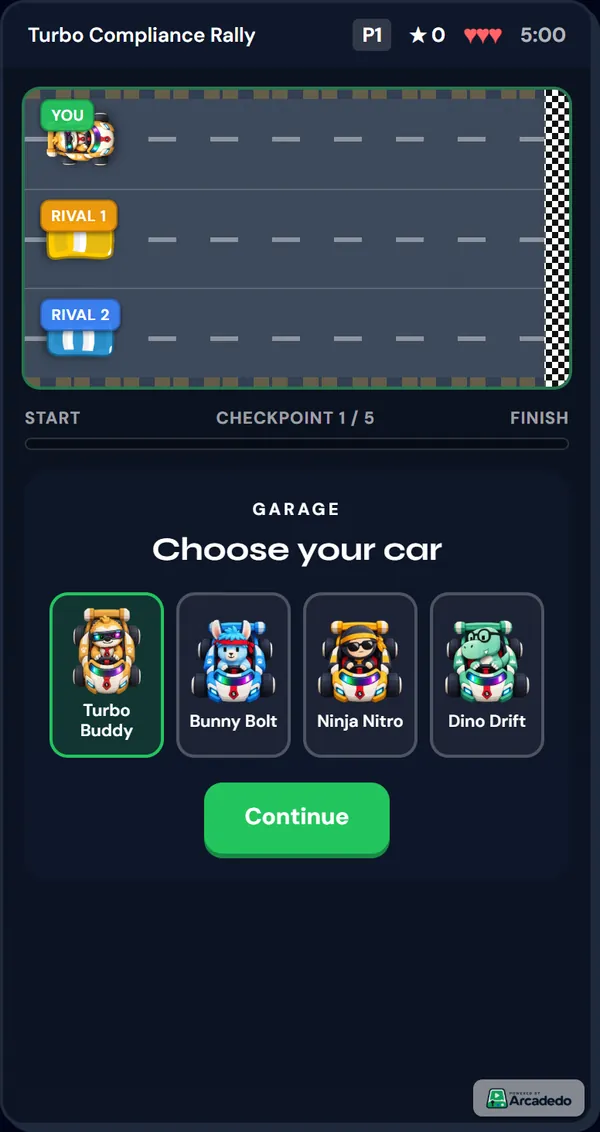
- Try the template. Open Turbo Quiz Racer and play the sample. Players pick a car, race two computer rivals and answer one question at each checkpoint.
- Click Use This Template. You land in the editor with the sample race ready to change.
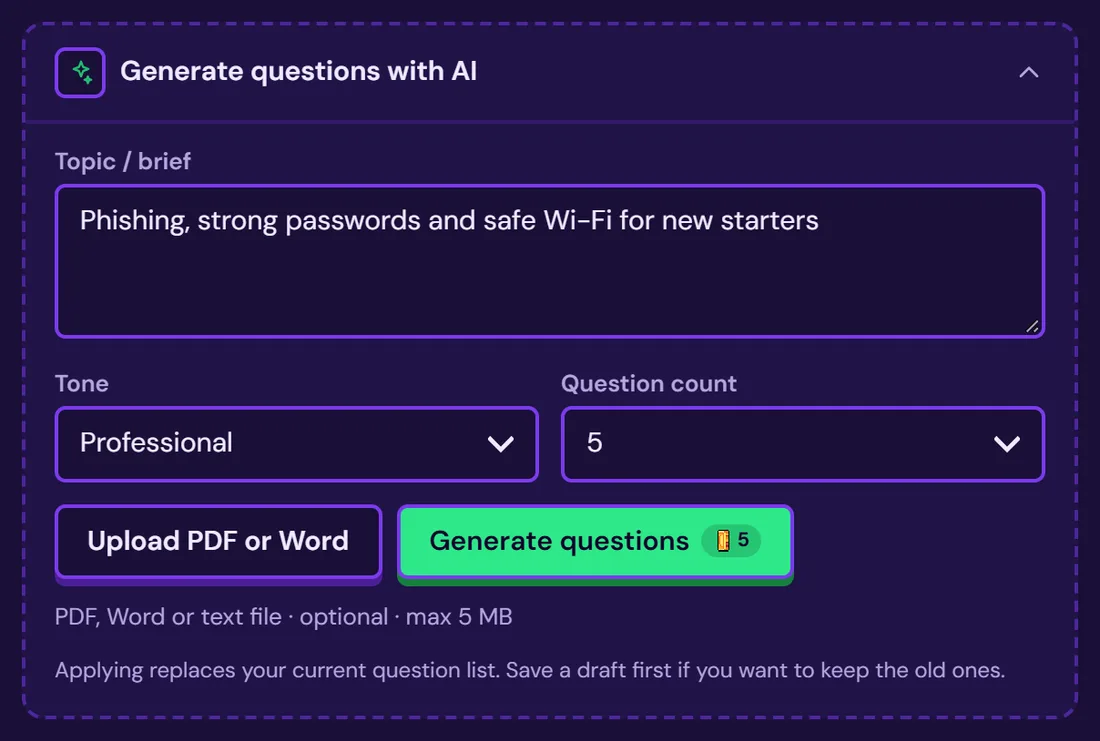
- Add your questions. In the Content step, write each question with two to four answer choices, mark the correct one and add a one-line explanation. Or click Generate with AI to draft them from a topic or an uploaded PDF, Word or text file up to 5 MB (5 credits per batch), then edit every draft. The Add questions or facts guide walks through both. Already have a policy document? See how to turn a PDF into a quiz game.
- Set the rules. In Settings, choose the number of questions, lives, timers and pass score. The next two sections give numbers that work.
- Brand it. Add your logo and colours, and choose the player car, the rival pair and the track.
- Write the start and end text. In Info, add a title, how-to-play text and the win and fail messages.
- Publish and share. Publish from the Go step to get one link that plays on phones and desktops (Share your game link). Gametize customers can paste it into a campaign (Embed in Gametize).
What settings should you choose?
Start with the defaults for a first run: five questions, three lives, 30 seconds per question and a five-minute race. For a graded check, raise the questions to eight to ten and set a pass score that matches the share of correct answers you need. Shorter timers suit simple recall; longer ones suit scenarios.
| Setting | Range | Default | Recommendation |
|---|---|---|---|
| Number of questions | 1 to 10 | 5 | 5 for practice, 8 to 10 for a graded check |
| Lives | 1 to 5 | 3 | 3; use 2 for a stricter test |
| Timer per question | 10 to 60 seconds | 30 | 20 for facts, 40 to 60 for scenario questions |
| Total race timer | Off to 10 minutes | 5 minutes | Leave at 5 unless questions are long |
| Points per correct answer | 50 to 200 | 100 | Keep 100; it makes the arithmetic easy |
| Penalty per wrong answer | 0 to 100 | 25 | 25; raise it if guessing is a problem |
| Game speed | 0.7 to 1.4 | 1.0 | Lower for people new to games |
| Pass score | 0 to 1,000 | 100 | Work it out (next section) |
Here is what happens in the race. A correct answer adds points and moves your car toward the finish. A wrong answer, or running out of time, costs a life and the penalty, and the car barely moves. Either way, the player sees the explanation before the next checkpoint.
There are three bonuses: +50 for answering in roughly the first third of the timer, double points on every third checkpoint, and a growing streak bonus from three correct answers in a row. Bonuses reward people who know the material well, but they can only add points, never take them away.
For deeper guidance on length, see how many questions a training quiz should have.
How do you set a fair pass score?
Decide how many correct answers you need, then multiply by points per correct answer and subtract the penalty for the wrong ones you allow. Ignore bonuses: they only add points, so a player who meets your bar without them always passes. Then check that lives allow that many mistakes.
Two rules decide a pass in Turbo Quiz Racer. The player must reach the finish, which means answering every question before lives or race time run out, and must reach the pass score. Lives work as a hidden limit on mistakes: with three lives, the third wrong answer ends the race.
| Questions | Bar you want | Wrong answers allowed | Lives needed | Pass score (100 per correct, 25 penalty) |
|---|---|---|---|---|
| 5 | 4 of 5 (80%) | 1 | 2 or more | 4 × 100 − 25 = 375 |
| 8 | 6 of 8 (75%) | 2 | 3 or more | 600 − 50 = 550 |
| 10 | 8 of 10 (80%) | 2 | 3 or more | 800 − 50 = 750 |
| 10 | 7 of 10 (70%) | 3 | 4 or more | 700 − 75 = 625 |
The default pass score of 100 is deliberately low, so the sample race is easy to finish. Raise it before you use the game as a real check.
What questions work best in a quiz race?
Short questions with one clearly right answer work best, because the timer is visible and people read under a little pressure. Ask about decisions people make at work rather than definitions, keep answer choices to a few words, and write a one-sentence explanation that gives the reason, not just the answer.
- Ask about the decision. "A customer asks for a refund on day 35. What do you do?" beats "What is the refund window?"
- Keep stems under about 20 words. Long scenarios belong in a template without a race clock, or with a 60-second timer.
- Make wrong options believable. Use the mistakes people really make, not joke answers.
- Write the explanation for the person who got it wrong. One sentence: the rule and why it exists.
Our guide on how to write multiple-choice questions has before-and-after examples. If your content is about choosing a route or spotting hazards, Checkpoint Rush puts questions on the road as lanes instead.
How do you know the quiz game worked?
Look at the pass rate and the most-missed questions first, then replay the same race a few weeks later to see whether scores hold. Each Arcadedo game has an analytics page with players, plays per player, completion rate, pass rate, average score and the questions people miss most.
- Low pass rate overall: the bar or the timer may be too strict, or the training did not cover the topic.
- One question missed by most people: re-teach that point, or rewrite the question if it is unclear.
- Many plays per player: people are retrying to pass or to beat their score, which is extra practice.
- Scores drop on a replay a month later: schedule short refreshers. Spreading practice over weeks improves long-term memory (Cepeda and colleagues, 2008).
Research on gamified learning in general is encouraging but modest: a meta-analysis of 40 experiments found small positive effects on learning, motivation and behaviour (Sailer and Homner, 2020). Your own pass rates will tell you more than any average. If you are still deciding whether a game fits at all, read quiz or game for a knowledge check.
Frequently asked questions
Can I make a quiz game for training for free?
Yes. In Arcadedo, building, hosting and publishing games is free on every account, and every template is included. Credits are only used for optional AI help, such as drafting questions from a document, and for removing the small Arcadedo badge.
Do players need an account or an app?
No. A published game is a link that opens in any modern browser on a phone, tablet or computer. Share it by email, chat or your intranet, or embed it in a Gametize campaign.
How many questions can a quiz race have?
Turbo Quiz Racer holds up to ten questions per race, one per checkpoint. Five is enough for a quick practice round; eight to ten suits a graded knowledge check. For a longer test, split it into two races on different topics.
How do I turn a quiz into a game?
Keep the questions and change what answering does. In a quiz game, each correct answer moves you forward and each wrong one costs a life, with an explanation after every answer. Pick a template such as Turbo Quiz Racer, paste in your questions and set a pass score. Our guide to turning a quiz into an arcade game compares the formats.